
Joomla beginners tips (11)
In this section, you'll find basic tips for you who just started exploring Joomla! CMS. There are a lot of small tips and tricks out there that make your life with Joomla easier. Here's the place to find them.
As it happens, readers email me about problems on their Joomla sites or about things they don't quite get. And I try my best to answer their questions. I don't have the time for doing specific support for every user that emails me, but sometimes a quick look at the site can help the user solve his problem easily.
Last week, a reader emailed me about some problems with the content on his site. For some reason, the content was showing nicely on all browsers except on Internet Explorer 8. Was I able to help?
Below the content editor in a Joomla article, you will find a couple of buttons. These buttons are there to enable tou to add images, read more dividers and page breaks to your articles.
If you're using JCE or another WYSIWYG editor for Joomla, you probably want to get rid of these buttons. JCE has its own image manager and icons for both read more and page break. So having the additional buttons below the editor can confuse your users. The image button in particular, as it leads to the default Joomla image functions and not the improved ones in JCE.
In this post, I'll show you how to disable the buttons.
After sending out my weekly newsletter a while ago, I got this question:
Is there a way to make a published article not searchable from com_search component?
And yes, there is. And it's so easy to do. Read on to learn how to restrict search to a published article in Joomla.
I got this question the other day:
I have a question that is quite important for me and for all that would want to use Joomla as a blogging CMS. Is there any plugin or something to schedule articles in a similar way as Wordpress?
What I mean is: Sometimes I schedule an article to be published for example 2 hours later. For some reason, I need to write and publish a fast article before the scheduled article goes live. The problem is that when the scheduled one is published, it will appear just below the recently published article. I would like it to be published over the article, appearing as the newest one.
Actually, this is easily done with Joomla itself.
Joomla 1.5 installs with three pre-installed templates. These templates are good as a starting point when learning Joomla. Still, if you want to create a Joomla website, you will want to look at other templates as well.
There are a lot of templates out there. Both free and commercial. I usually recommend spending a few dollars on a template from a professional provider if you're creating a business website. You will get those dollars back in less frustrations, better search engine rankings and easier customization. The support is also better (not always, though).
This tutorial will show you how to install a Joomla template and how to get started customizing it.
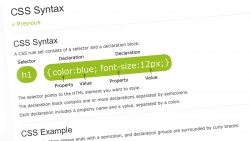
I regularly scan the unanswered questions in the Joomla forums. Many times, the questions posted have to do with how the output of Joomla is presented. This may have to do with the template, but oftentimes it has to do with the CSS (stylesheet) of the Joomla template.
New users are often unaware of how CSS and Joomla works. There is confusion regarding if the problem relates to the Joomla core, or the template installed.
In this post I will try and give you an overview on how to use CSS in Joomla.
A short tip showing you the best way to link directly to Joomla articles when using SEF URLs (search engine friendly URLs).
Joomla comes with a built-in text editor: TinyMCE.
Although this is OK for many users, the need to change it to something more advanced may arise. When installed, you need to make sure that the editor is selected as the default editor.
I'll show you how to do that.
This is a problem that may arise oif you upload images to your image folder. The default configuration of Joomla sets the path to the image folder to images/stories. If you upload your images outside the stories folder you won't be able to access them from the editor.
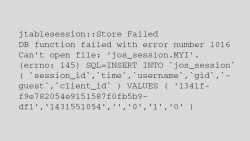
Sometimes, you might experience your Joomla jos_session table going out of wack. This may result in your website displaying nothing but an error message.
Relax, I'll show you how to fix it!
If you're just starting out using Joomla, some concepts can be a bit confusing.
For instance, what is the difference between the Feed Display module and the Syndication module? What do I use them for?