

I got this question the other day:
I have a question that is quite important for me and for all that would want to use Joomla as a blogging CMS. Is there any plugin or something to schedule articles in a similar way as Wordpress?
What I mean is: Sometimes I schedule an article to be published for example 2 hours later. For some reason, I need to write and publish a fast article before the scheduled article goes live. The problem is that when the scheduled one is published, it will appear just below the recently published article. I would like it to be published over the article, appearing as the newest one.
Actually, this is easily done with Joomla itself.
You might think that the solution is in the sort order for the frontpage layout. Not this time.
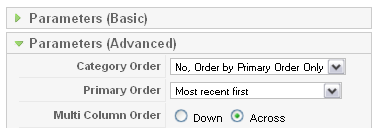
You need to have the settings for "Category Order" and "Primary Order" set as follows:
You can also set the primary order to "Default" as this setting is the same as "Most recent first":
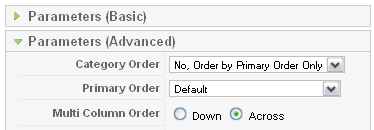
However, even if you do this, you still end up with the scheduled post below the last written post.
The solution lies in the difference in Creation and Publishing dates. When a Joomla article is created, it gets a value in the "Created Date" field under "Parameters (Basic)". The same value is added to the "Start Publishing" field. Thus, the article will publish immediately if no other setting is chosen. If you subsequently change the "Start Publishing" field the article will be published at the set time.
But, as you saw from the question I got, this means that the scheduled post will appear after a post which is created later. Why is that? You might have seen the connection already.
The solution
To have the scheduled post appear before the last written post, you need to set the value for "Created Date" to the same value the "Start Publishing".

It appears that the "Most recent first" setting relates to the "Created Date" and not to the "Start Publishing" date. Quite strange that it's not possible to change this anywhere. But at least you now have the solution.
Thanks to Antonio for this question.