
joomlablogger-logo

JoomlaBlogger
  • Home
  • Tutorials
    • Joomla extension tutorials
    • Joomla core tutorials
    • Template tutorials
  • Joomla Tips
    • Joomla security tips
    • General Joomla Tips
    • Beginners tips
    • Joomla extension tips
  • News
    • Weekly Joomla news posts
    • Joomla Evangelism
    • Personal views
    • Joomla Templates
    • Interviews
    • Joomla extension news
    • General web tips
    • Joomla events
    • Joomla development
  • Videos
  • SEO
    • Joomla SEO
  • About
    • Off-topic
      • Books I like
    • Advertise
      • Disclaimer
    • Subscribe
  • About
  • Subscribe
  • Joomla business templates

Google Analytics asynchronous tracking Joomla plug-in

Kristoffer Sandven

by Kristoffer Sandven

freshClicksGAAIf you use Google Analytics to track your website traffic you should read this. Google Analytics now provides a new Asynchronous Tracking Code snippet as an alternate way to track your website.

Think of the asynchronous tracking code snippet as a script that uses a "separate lane" to handle part of the processing of your webpage. As the number of cars (or in this case, scripts on your webpage) increases, the asynchronous tracker uses this lane to reduce webpage load time. Websites that use many scripts or rely on rich media content will especially benefit from this new method, but even lightweight sites will see improvements.

The new tracking snippet offers the following benefits:

  • Faster tracking code load times for your web pages due to improved browser execution
  • Enhanced data collection and accuracy
  • Elimination of tracking errors from dependencies when the JavaScript hasn't fully loaded

The asynchronous tracking code is now in Beta and available to all Google Analytics users. Using the new tracking code is optional: your existing Google Analytics code will continue to work as-is. But if you want to improve your webpage load times and fine-tune the accuracy of your Analytics data, then we think you'll love this new option.

How to use this function with Joomla

I found a Joomla plugin over at FreshClicks.net which gives you this functionality without hacking anything. The Joomla 1.5 plugin is set up so that you can easily add the new tracking code to your Joomla powered site. 
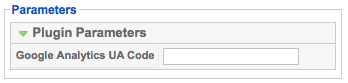
Google Analytics Asynchronous plug-in

Installation is easy:

  1. Download the plg_FCGanalytics1.0.0.zip
  2. From the Joomla administrator console go to Extensions/ Install
  3. Under “Upload Package File” click “choose file” and browse to the file you just downloaded. Once you select it, click “Upload File & Install“
  4. Once you see the “Success” message, go to Extensions/ plugin manager and click on the plugin named “FreshClicks Google Async Analytics”
  5. Under the plugin paramaters add your Google Analytics UA Code (the code should look something like UA-123456-1), under Enabled choose “Yes” and then click “Save”

I've installed the plug-in in this blog and it seems to work just fine.

If you prefer to insert the Google Async code yourself, read the instructions here.

  • twitter
  • facebook
  • google+
  • pinterest
  • linkedin
  • pocket
Read 52483 times Originally published on Monday, 21 December 2009 08:32
Last modified on Friday, 01 January 2010 20:23
 
comments powered by Disqus
Published in Off topic
  • Google Analytics
  • Tracking

Related items

  • Joomla blog posts from around the web (8/12)

Most popular posts

  • Six steps to get your Joomla site indexed in Google

    Six steps to get your Joomla site indexed in Google OK, so you have a brand new site going on - and it's all made in Joomla. But how to get traffic from the search engines? There are several things you can do to ensure that Google and other search…
    in Joomla SEO Read more...
  • How to add a PDF file to a Joomla article

    A common task many web site owners do regularly, is to add PDF files or other documents to their articles. In this post, you will learn how to add a link to a PDF or any other document file to a…
    in Joomla core tutorials Read more...
  • Joomla CSS for beginners

    Joomla CSS for beginners I regularly scan the unanswered questions in the Joomla forums. Many times, the questions posted have to do with how the output of Joomla is presented. This may have to do with the template, but oftentimes it has to do…
    in Joomla beginners tips Read more...
  • Subscribe to the JoomlaBlogger newsletter

    To keep track of what's going on here at JoomlaBlogger, the best way is to subscribe to my mailing list. As a subscriber, you will get: A weekly summary of blog posts - tips, tutorials and newsfrom the last seven…
    in About Read more...
  • About JoomlaBlogger

    Welcome to JoomlaBlogger, a blog about the content management system Joomla! and all things related to running a successful website based on this CMS. My name is Kristoffer Sandven and I work as a professional Search Engine Optimizer (SEO) and…
    in About Read more...
  • Oops: Page not Found

    Are you lost? Sorry, but the content you requested could not be found. Did you write the correct address? You have a few options now - don't despair: - Use the top menu to navigate my articles- Visit the sitemap…
    in Uncategorised Read more...
  • 9 awesome free Joomla templates for Joomla 1.5

    9 awesome free Joomla templates for Joomla 1.5 Finding a great template for your Joomla site can be a challenge. There are tons of free Joomla templates out there, but to be honest: Most of them are junk. Finding quality free Joomla templates is important to ensure you…
    in Templates Read more...
  • Winner of 'Joomla Greatest Challenge Contest' Chosen

    A while ago, I announced my 'Joomla Greatest Challenge' Contest. The contest involved writing about what you think is the greatest challenge in using Joomla. The winner has been now been chosen.
    in Joomla evangelism Read more...
  • 'Joomla Greatest Challenge' Contest

    I'm happy and excited to announce my very first contest here at Joomlablogger.net. If you have a Joomla website you can take part in the contest. Jump in and participate! It's easy to enter and the price is very useful…
    in Joomla news Read more...
  • Tutorial: How to add module positions to a Joomla template - part 1

    Tutorial: How to add module positions to a Joomla template - part 1 Last week, I did a post on how to add Javascript snippets to Joomla. The way I did this was by adding module positions to the template. In this post, I will delve deeper into how to add module positions…
    in Joomla template tutorials Read more...

Recent comments

  • Sitemap
  • Log in
  • Joomla CMS
  • Subscribe
  • Log in

The Joomla!® name is used under a limited license from Open Source Matters in the United States and other countries.
joomlablogger.net is not affiliated with or endorsed by the Joomla!® Project or Open Source Matters.
The Joomla!® logo is used under a limited license granted by Open Source Matters the trademark holder in the United States and other countries.

All content is copyright © 2009-2013 JoomlaBlogger.net - owned by iSee Communications as, Norway

© 2008 - 2025 Joomlablogger.net / iSee Communications as, Oslo, Norway.

Joomlablogger.net is not affiliated with or endorsed by The Joomla! Project™. Use of the Joomla!® name, symbol, logo and related trademarks is permitted under a limited license granted by Open Source Matters, Inc.

     
  • Home
  • Tutorials
    • Joomla extension tutorials
    • Joomla core tutorials
    • Template tutorials
  • Joomla Tips
    • Joomla security tips
    • General Joomla Tips
    • Beginners tips
    • Joomla extension tips
  • News
    • Weekly Joomla news posts
    • Joomla Evangelism
    • Personal views
    • Joomla Templates
    • Interviews
    • Joomla extension news
    • General web tips
    • Joomla events
    • Joomla development
  • Videos
  • SEO
    • Joomla SEO
  • About
    • Off-topic
      • Books I like
    • Advertise
      • Disclaimer
    • Subscribe