

This is the fourth part of a series of posts on how to work with meta elements in Joomla.
Meta tags are tags, or meta elements, that (mostly) contain information about the website or page which is not shown directly to the user.
In this part I will show you how to use the Google Webmaster Tools to monitor and improve your Joomla meta tags.
This is part four of a four-part series on Joomla meta tags. The other parts of this series are:
When you have your meta tags set up, I recommend using Google Webmaster Tools to check your work. If you don't have a Google Webmaster Tools account, set one up for free here.
You need to verify your site to be able to access information about how the site is indexed in Google. Additionally, the pages you have worked on need to be indexed in Google. I've previously written a post on how to get your Joomla site indexed in Google.
Diagnose Your Meta Tags
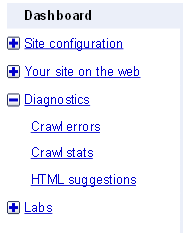
To see how the meta tags are rated by Google, choose your site and then 'Diagnostics'. Under this menu, you'll find 'HTML Suggestions'.
The tool will give you a list of pages which have no meta description, duplicate descriptions, no title, duplicate titles or meaningless titles:
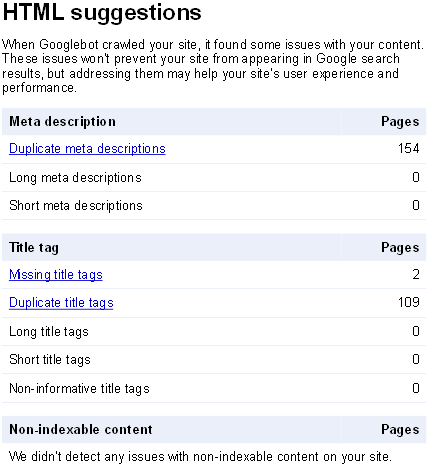
Using Google Webmaster Tools, it's very easy to spot any place in your site where you might have missed the title and/or description.
For instance, I spotted something I didn't think about earlier: When you have a section or category blog view, you might have enabled automatic pagination. The pages following the first one, will have titles like 'Page 2', 'Page 3' etc. That's not very helpful. I haven't found any way of changing these titles using the joomla core. With sh404SEF or another SEF extension, this is easily done.
Duplicate meta descriptions
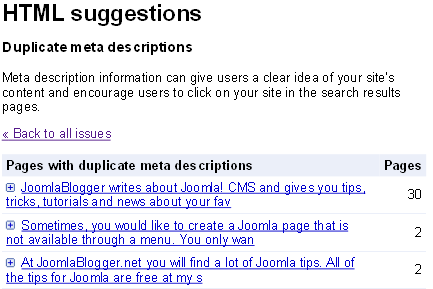
As you can see from this example, the default meta description from the Joomla Global Configuration is used on 30 pages.
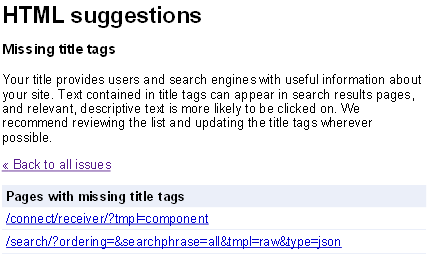
Missing title tags
Some components are quite lacking in the meta tags department. And sometimes they create a lot of pages automatically, so it's hard to tell if all title tags are OK. The 'Missing title tags' page presents the culprits.
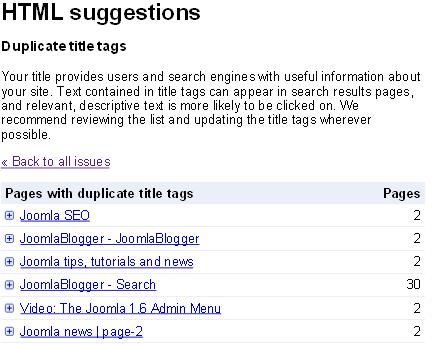
Duplicate title tags
As the title tag of the page is among the most important optimization factors of a page, you should make sure that they are all unique. As you can see - the search page on my site has 30 instances in the Google index. All with the same meta description. This is due to the fact that I use SuperBlogger from Joomlaworks to create tag search. Thus, there are permalinks from each tag to the search page, which gives Google a link to follow and a page to index.
However, there are no automatic way of creating unique meta description for the search page (that I know of, anyway). You need to enter these manually into sh404SEF.
Good luck working with meta tags in Joomla. If you have a large site, this task can be a large one. However, it's great fun seeing your site improve in the search engines after doing this work correctly.
Don't hesitate to comment if you have any questions.
 contain information about the website or page which is not shown directly to the user.
In this part I will show you how to use the Google Webmaster Tools to monitor and improve your Joomla meta tags.
)